
Product Updates
Ask a core facility manager where their instrument information lives and the answer is rarely one place. The equipment list is a spreadsheet in the facility office, calibration documents sit on a shared drive, bookings live in yet another tool, the data a user measured on a given instrument is scattered across local and network drives, and crucially, any information on how they did the experiment lands in their own notes, if anywhere. Lab teams sharing instruments have the same problem on a smaller scale. When a reviewer, funder or new postdoc asks which instrument, in which state, produced a dataset, someone has to reconstruct the answer, which is time-consuming and error-prone.
Persistent identifiers for instruments, such as PIDINST, are meant to solve part of this, yet most instruments don’t have one. At FDM@Campus in Göttingen in September (slides) we argued that such identifiers only become adopted when three conditions are met:
Put simply, identifiers need to become part of everyday research workflows rather than an extra step after them. The recent releases of RSpace are about making that happen for the people who run instruments every day.
When we talk to facility staff and lab managers, the same questions come up:
Since July, instruments have been a native object type in RSpace Inventory, with the same core functionality, such as templates, search and auditability, that samples and containers already have. Here is how the new functionality helps answer the questions above.
Few facilities start from zero with their instrument inventory; many record their instruments in spreadsheets or similar tools. In RSpace Inventory, you can import from such solutions using CSV files, straight into the default PIDINST-based template and into the containers that represent your buildings and rooms. Teams that prefer to do this programmatically can do the same through the RSpace API (see the API tutorial and the Python client) or the RSpace MCP server.
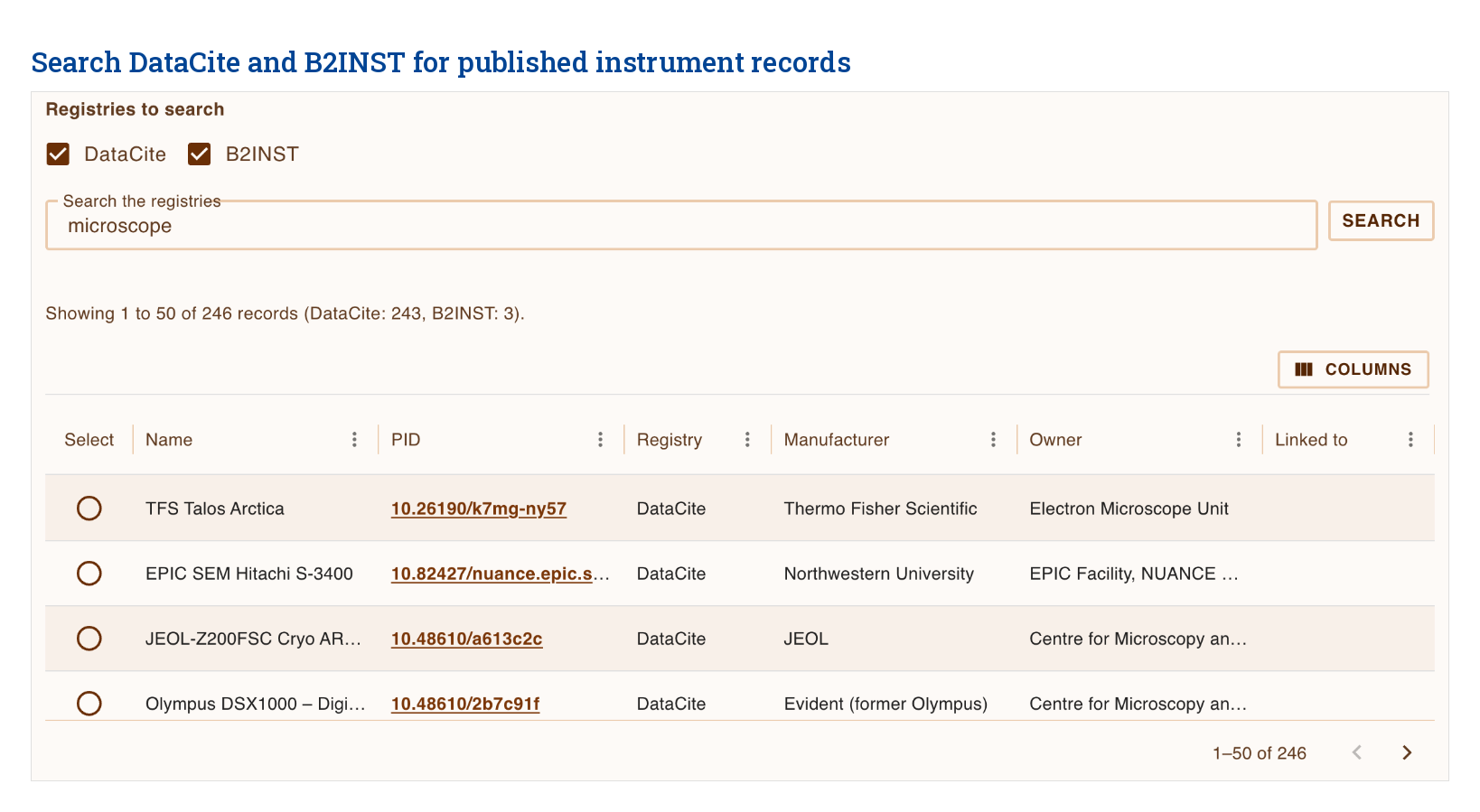
If an instrument in your lab or facility already has a published PIDINST ID, there is no need to register it again or retype all its details. From Inventory, search the public DataCite and B2INST registries and create the Instrument from the published record. RSpace fills in the data from the public record and links the PID to the new record. Since the PIDINST ID was created elsewhere, RSpace doesn’t take over the management of the instrument’s published data. Inside RSpace, however, the instrument record can be extended flexibly with additional data and metadata.
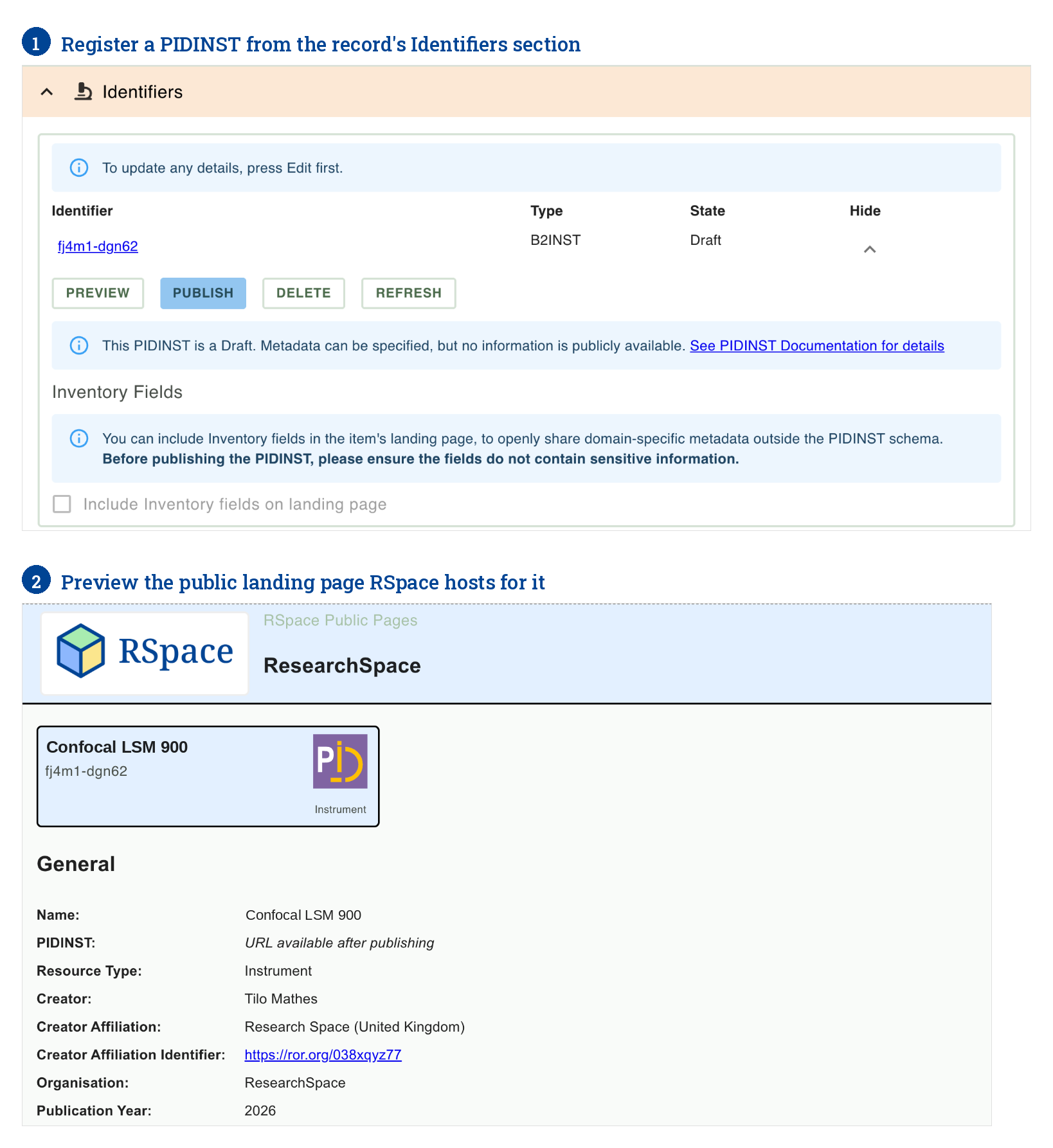
For instruments that don’t have a PID yet, you can register one directly from the record’s Identifiers section, with the registry your institution uses, DataCite or B2INST. Beyond the mandatory core metadata, the instrument’s measurement technique and calibration links are added to the PIDINST record as well.
From then on, the instrument and its PID are managed in one place. Facility staff keep working on the RSpace record they already use: location, calibration, maintenance documents and lab-specific fields. RSpace hosts the instrument’s public landing page itself, so the lab’s own descriptive fields can optionally be shown on the landing page and stay current with the record. While a PIDINST ID is still a draft, every save also updates the registry copy; for a published DataCite record, one click republishes the latest metadata.
As with every RSpace Inventory item, each change is versioned, so you can open the record as it was on any past date, and the audit trail shows who changed what and when, including each attempt to update the registry.
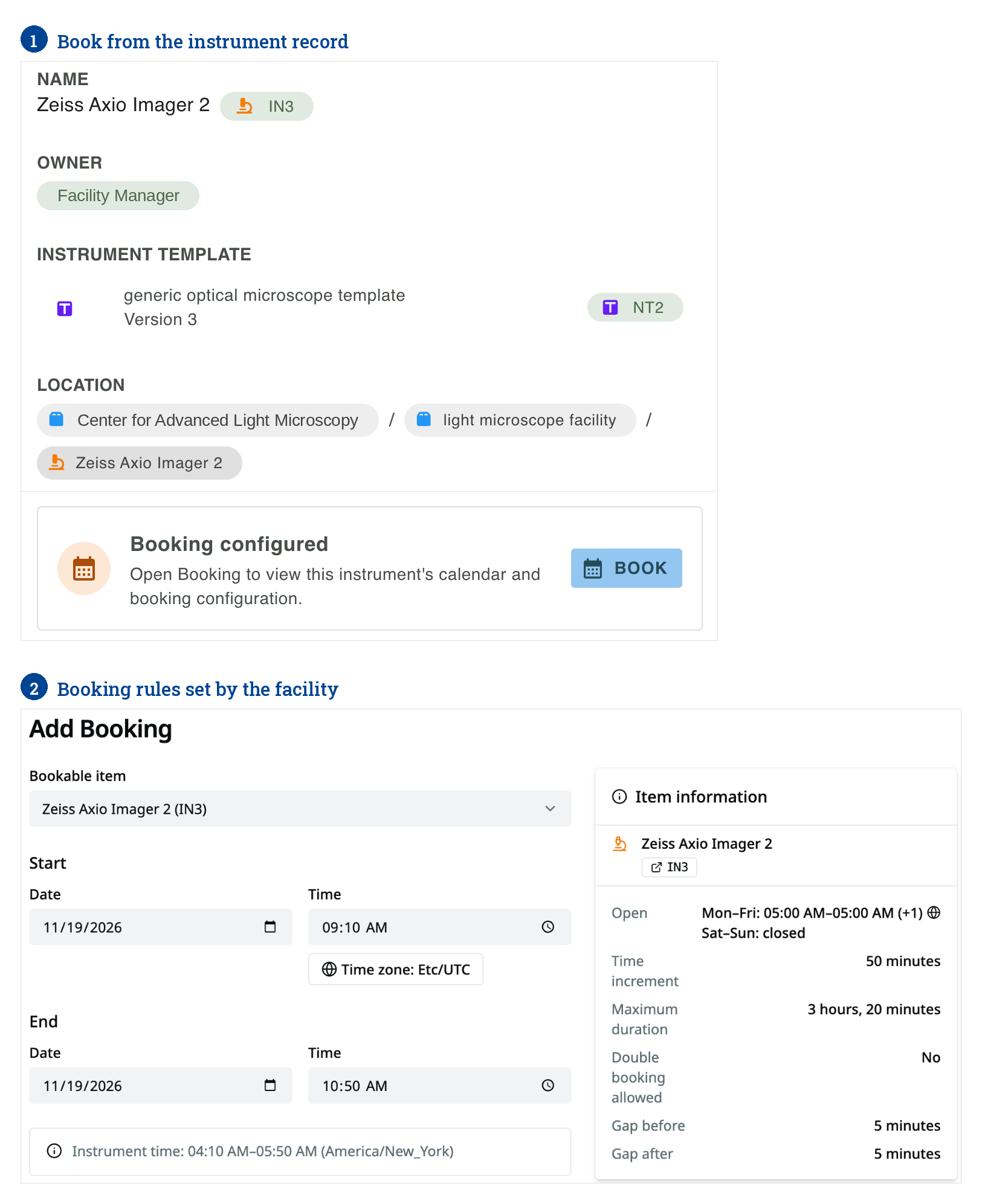
Instrument booking in RSpace is currently in release. Facility staff will be able to mark an instrument as bookable and set its rules: opening hours, time slots, maximum duration and buffers between sessions. Its availability will show on the instrument record, and users will book a time slot from the record or from a calendar, without double-booking. Because booking lives on the same record as the instrument’s description, location and calibration history, the people using an instrument will see how it is set up before they sit down at it. Over time, that also gives facility managers a single place to report on who used which instrument, and when.
This is where the facility record meets the lab’s work. Researchers reference the instrument from their notebook entries through the List of Materials, so the instrument is part of the record of the experiment, not a name typed into a free-text field.
The instrument record can also be linked to everything around it, using typed relations: calibration and maintenance records, the SOP and onboarding documents for using it, and the samples and data files it produced. A link can point to the latest version of a document or be pinned to the exact version that applied at the time, and the instrument’s info panel lists every item that links back to it.
Over time, that builds a record of which work an instrument supported, alongside its bookings and calibration history. New team members get easy access to how an instrument is set up and looked after.
When a lab exports its work to a repository like Dataverse, the PIDINST IDs of the instruments in its Lists of Materials are added to the dataset metadata automatically, just as the IGSN IDs of the samples used already are. Anyone reading the dataset later can resolve both the instrument and the sample. This is one example of where globally resolvable identifiers with rich metadata, connecting instruments to the wider PID graph of samples, people, projects and research outputs, provide real value for researchers, facilities and funders.
Next on our instrument roadmap is support for Research Resource Identifiers (RRIDs), which many journals already ask authors to cite. RRIDs and PIDINST complement each other: an RRID can identify an instrument model, such as a particular confocal system, while a PIDINST ID identifies the physical instance in your facility. RSpace will let you look up an RRID and fill in the model details of an Instrument from it, so the record carries both. You will also be able to create an instrument template from an RRID, so every unit of that model starts from the same description.
The step-by-step guides are in our documentation: Search and import PIDINST instruments, Add PIDINST IDs to your Inventory items and Relationship linking in Inventory. How instruments fit into a facility’s wider documentation, from user agreements to multi-project work, is covered in our post on what core facilities can get out of RSpace.
We are building this with the people who run instruments, so tell us what you need. What does your instrument register look like today? What would make booking, calibration tracking or identifiers worth the effort for your facility or lab? Come discuss it at one of our upcoming open-source office hours, or get in touch.
RSpace is an open-source platform that orchestrates research workflows into FAIR data management ecosystems: request a demo or contact us to learn more.
July 28, 2026
Research documentation in the age of AIResearch Data Management
A personal reflection on AI, RSpace, and how we can start addressing provenance for AI agents as collaborators in research.
Read moreJune 23, 2026
Chemistry in RSpace: What a Year of Open-Source Development Looks LikeProduct Updates
A year after transitioning RSpace's chemistry tools to an open-source stack, we look at what has been built since: an open chemistry codebase on GitHub, PubChem compound import directly from documents, and stoichiometry tables connected to inventory management. We also preview what comes next, including chemistry-aware metadata in exports to generalist and domain repositories.
Read moreJune 9, 2026
What Core Facilities Can Get Out of Implementing RSpaceResearch Data Management
How core facilities in research institutions can leverage RSpace to manage documentation, user agreements, and multi-project workflows across diverse research groups.
Read moreJune 9, 2026
How RSpace Structured Templates Can Transform Your Lab DocumentationResearch Data Management
A look at how structured templates and forms in RSpace can streamline lab documentation, reduce errors, and help research groups build a shared knowledge base.
Read more