
Research Data Management
In the previous blog post, we discussed the individual benefits researchers and their lab groups can get from using structured templates for data and workflow capture. Here, we want to follow up on how central groups and service facilities that regularly interact with many different researchers on diverse research topics can leverage platforms like RSpace.
Many research institutions today have core facilities (CFs) that offer technical expertise and services to expedite projects (mainly) for in-house research groups. Implementing an ELN like RSpace in a CF context comes with its own specific challenges and opportunities that are different from a single lab group adopting it.
This post is based on conversations with core facility staff in the life sciences using RSpace or exploring adoption in their daily workflows. Drawing on those interviews and the experience of working with multiple CFs as a user, the following is a breakdown of how CF structures map onto RSpace — and what templates make sense for each setup.
Implementing an ELN in a CF could deliver benefits including: digitised entries that eliminate the need to navigate individual documentation systems; keyword search that identifies entries in seconds; centralised storage containing protocols, user agreements, meeting minutes, and experiment entries; shared access to project documents for efficient collaboration; recoverable version histories; and an integrated electronic signature system.
These become particularly important as projects change hands with staff turnover. Workflows can be even more streamlined if facility clients are also RSpace users, enabling direct collaboration within a single platform.
In practice, CFs tend to fall into three types:
Type 1 — Minimal staff collaboration. Users are trained on instruments and are free to book access to CF-managed equipment. Staff are available for troubleshooting but are not directly involved in experiments. (Examples: light microscopy, FACS)
Type 2 — Close collaboration. Staff perform experiments on behalf of the user, or the user performs them with frequent communication to monitor progress. (Examples: bioinformatics, proteomics, metabolomics)
Type 3 — Full service. Staff perform all experiments independently. The user provides the sample and receives a final report. (Examples: cryo-EM, sequencing services, structural characterization)
Beyond service type, CFs vary in their operational structure. The two main models are:
Sequential model — Service requires stepwise progress, where each step depends on completion of the previous one. (Example: bulk mRNA sequencing, where cell culture precedes total mRNA extraction, which precedes cDNA library preparation before NGS)
Simultaneous model — Service is not entirely dependent on sequential steps. Multiple experiments may be conducted in parallel. (Example: a protein production facility conducting MALDI-TOF measurement of a recombinant protein while running a NATIVE-PAGE from a parallel purification batch)
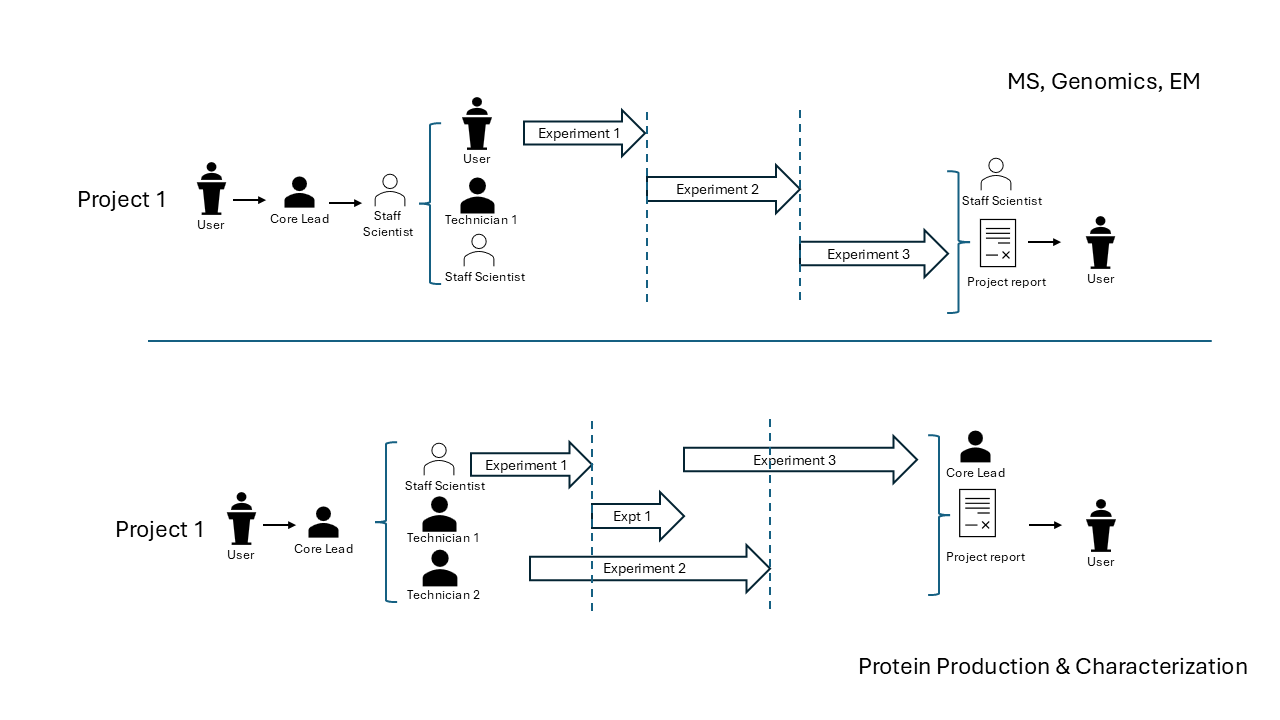
Within a CF, responsibilities are distributed across roles. The case manager is the main point of contact for the user and is responsible for all communications. In a multiple case manager model, projects are distributed across research groups; in a single case manager model, one person manages all incoming work.
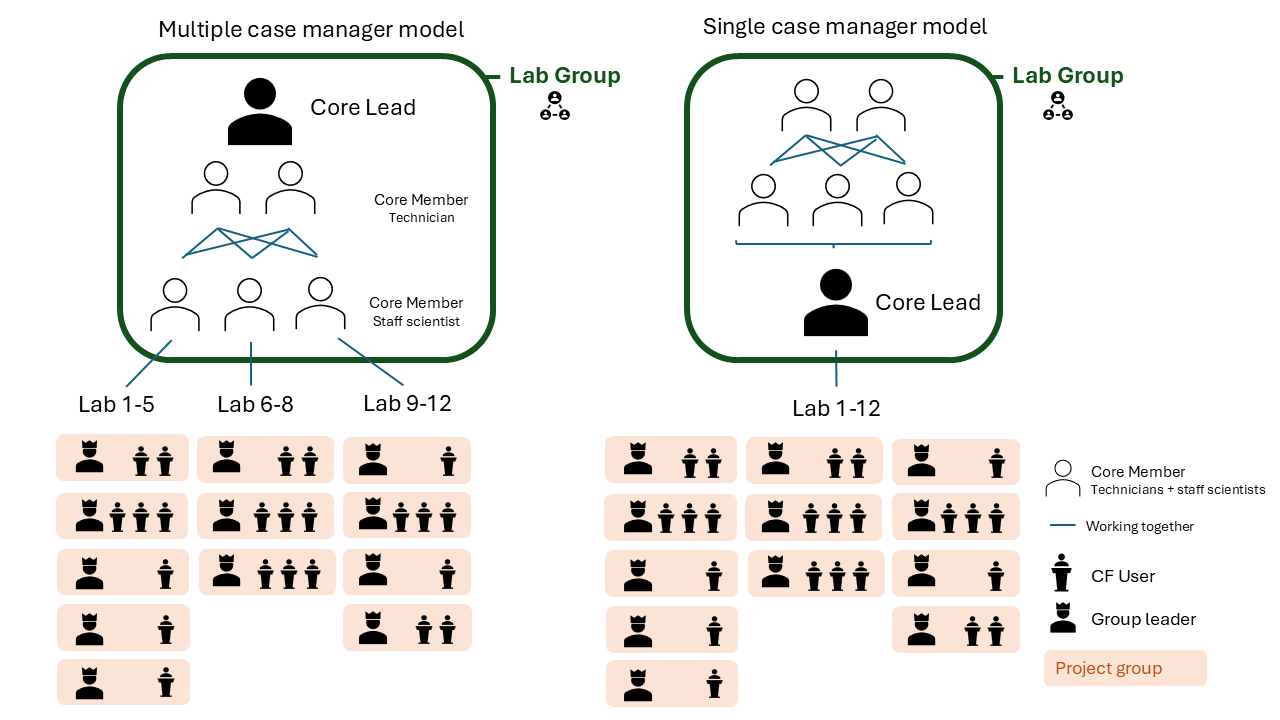
CFs can combine structures and task distributions across the service types outlined above.
Forms are particularly valuable in CF contexts where the same documentation is produced repeatedly across projects. Examples include user registration forms (capturing group leader, project description, sample safety levels, sample type), imaging experiment forms (sample preparation date, imaging date, results, findings), and maintenance logs (routine checks, outstanding problems, facility member contacts).
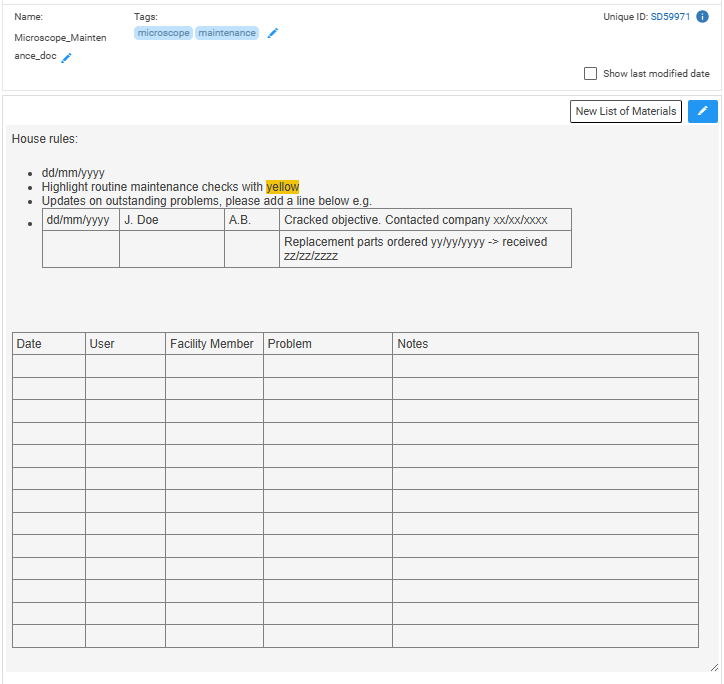

The key advantage is that all documents created from the same form can later be grouped and exported as a .CSV — giving the facility a structured record of all projects, users, and outcomes.
In addition to the default lab group (containing immediate members of your research group/CF), you can set up custom project groups consisting of the members contributing to a specific project. This may include multiple CF members, or just the case manager responsible for the final report and user communication.
For each user, several groups may exist — some for sharing sample preparation logs, others for receiving experiment results from the CF.

From the perspective of a CF member, this structure allows you to manage access across multiple simultaneous projects without cross-contaminating records between clients.
All templates discussed in this post are available in the RSpace community template repository.
Contributions are welcome — if you work in or with a core facility and have documentation structures that have worked well for you, please consider sharing them. See the contributing guide for how to submit.
We look forward to your contributions!
RSpace is an open-source platform that orchestrates research workflows into FAIR data management ecosystems: request a demo or contact us to learn more.
July 28, 2026
Research documentation in the age of AIResearch Data Management
A personal reflection on AI, RSpace, and how we can start addressing provenance for AI agents as collaborators in research.
Read moreJune 23, 2026
Chemistry in RSpace: What a Year of Open-Source Development Looks LikeProduct Updates
A year after transitioning RSpace's chemistry tools to an open-source stack, we look at what has been built since: an open chemistry codebase on GitHub, PubChem compound import directly from documents, and stoichiometry tables connected to inventory management. We also preview what comes next, including chemistry-aware metadata in exports to generalist and domain repositories.
Read moreJune 9, 2026
How RSpace Structured Templates Can Transform Your Lab DocumentationResearch Data Management
A look at how structured templates and forms in RSpace can streamline lab documentation, reduce errors, and help research groups build a shared knowledge base.
Read moreApril 21, 2026
Introducing The Guide to the RSpace ProjectOpen source
We're launching The Guide to the RSpace Project - a new community resource covering how to contribute to, understand, and engage with RSpace as an open source project, developed with support from the Birdaro training program.
Read more